
Real AI systems we've designed and shipped
A closer look at the systems we build for service businesses — what each one is, what it does, why it's valuable, and the real problems it solves.
Four systems that capture demand on autopilot
AI Lead Recovery System
What it is
An automated outreach engine that re-engages old, cold, and unconverted leads across text and email until they book or opt out.
What it does
Works through aged and 'no-response' leads with on-brand, multi-step sequences, then hands warm replies straight to your team.
Why it's valuable
Turns leads you already paid to generate into booked jobs — recovered revenue without spending another dollar on ads.
Problems it solves
Most service businesses sit on hundreds of dead leads that never got a second touch. This makes sure no lead is ever forgotten.
AI Missed-Call Text-Back System
What it is
An always-on responder that instantly texts back every missed call so the lead never goes cold.
What it does
Fires within seconds of a missed call, starts a real two-way conversation, answers common questions, and captures after-hours demand 24/7.
Why it's valuable
Most callers who hit voicemail call a competitor next. Catching them instantly turns missed calls into booked jobs around the clock.
Problems it solves
Owners and techs can't answer every call — on a job, after hours, or slammed. Every missed call is lost revenue, and this closes that gap automatically.
AI Appointment Booking Workflow
What it is
An AI assistant that qualifies inbound leads and books them straight onto your calendar.
What it does
Greets and qualifies every inquiry, checks real availability, books the right slot, and sends reminders that cut no-shows.
Why it's valuable
A fuller, better-organized schedule without the back-and-forth — and without tying up office staff.
Problems it solves
Manual scheduling is slow and leaks leads between 'interested' and 'booked.' This removes the friction so more inquiries become confirmed jobs.
AI Estimate Follow-Up System
What it is
An automated follow-up engine that chases every quote and estimate until it's won or formally closed.
What it does
Triggers the moment a quote goes out, runs smart-timed text and email touches, and stops the instant the customer replies.
Why it's valuable
Close rates climb when every estimate gets persistent, professional follow-up — and owners stop chasing quotes at 9 PM.
Problems it solves
Most estimates never get a second follow-up, so winnable jobs quietly die. This makes sure every quote gets worked.
OpsBrain — AI Operations Command Center
An internal AI ops layer that reads every tool a business already uses and tells the owner what actually matters — before they've finished their coffee.
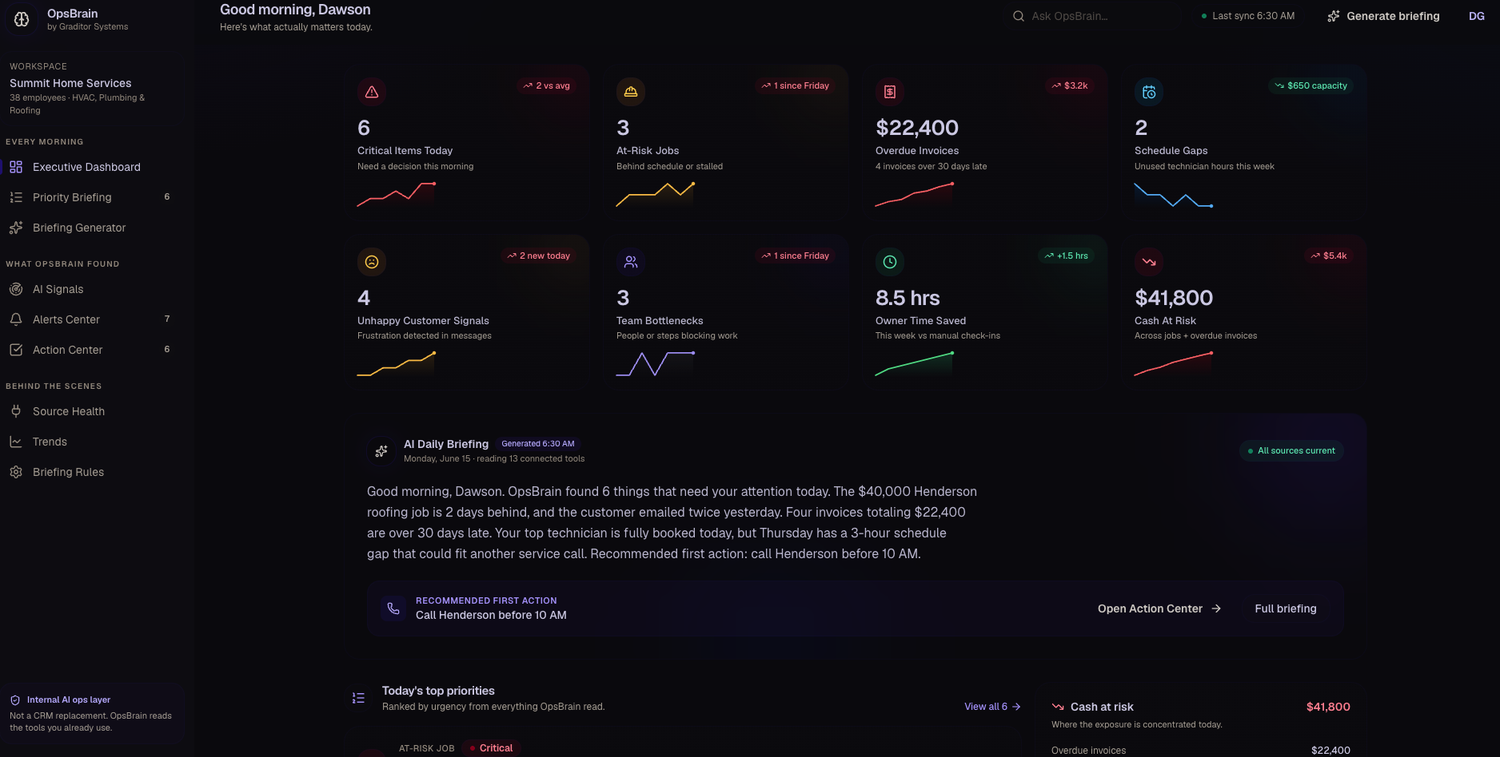
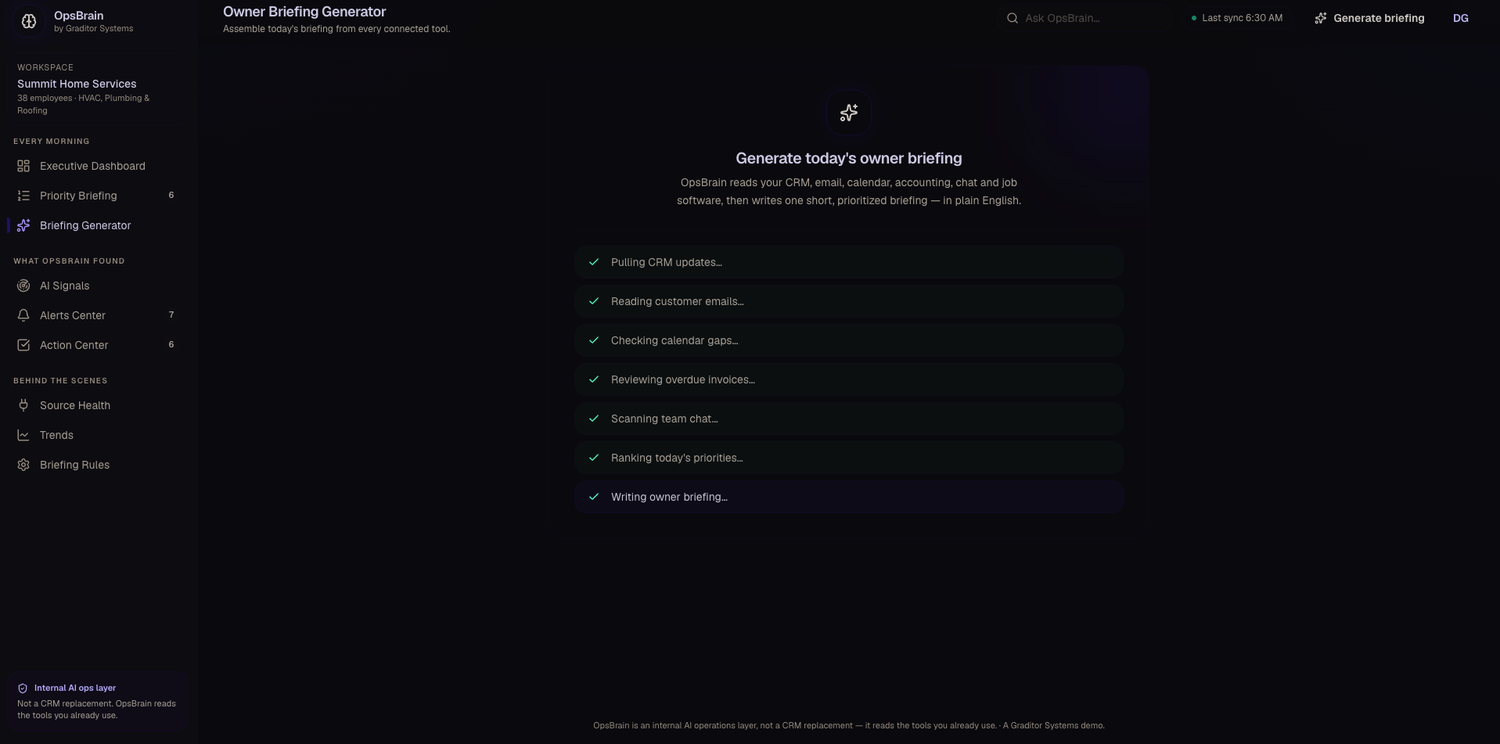
OpsBrain is a custom AI operating system we built for a multi-trade home-service company. It doesn't replace the CRM or job software — it sits on top of all of it. Every morning it reads 13+ connected tools, then writes one short, prioritized briefing in plain English so the owner knows exactly where the money, the risk, and the bottlenecks are for the day.
What it is
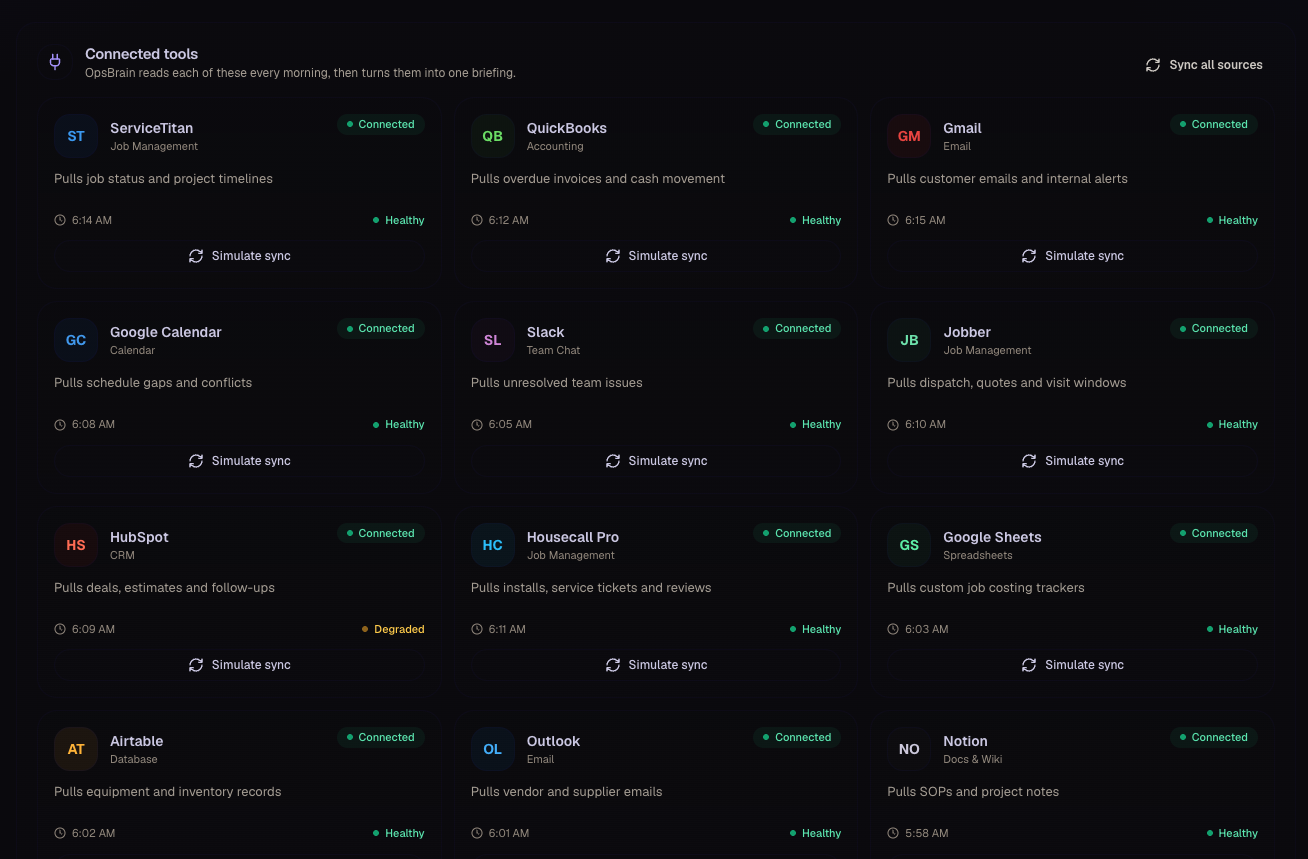
A private 'AI chief-of-staff' that connects to the systems a business already runs — ServiceTitan, QuickBooks, Gmail, Google Calendar, Slack, Jobber, HubSpot, Housecall Pro and more — and unifies them into one command center.
What it does
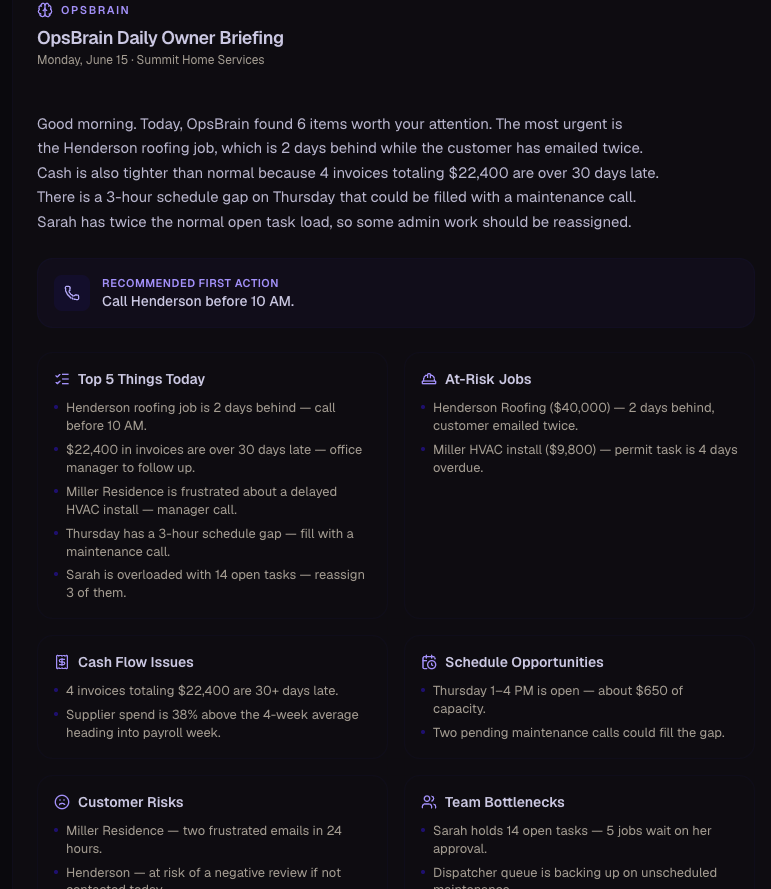
At 6:30 every morning it pulls CRM updates, customer emails, calendar gaps, overdue invoices, and team chat, ranks the day's priorities, flags at-risk jobs, cash at risk, unhappy-customer signals and team bottlenecks, and recommends the single most important first action.
Why it's valuable
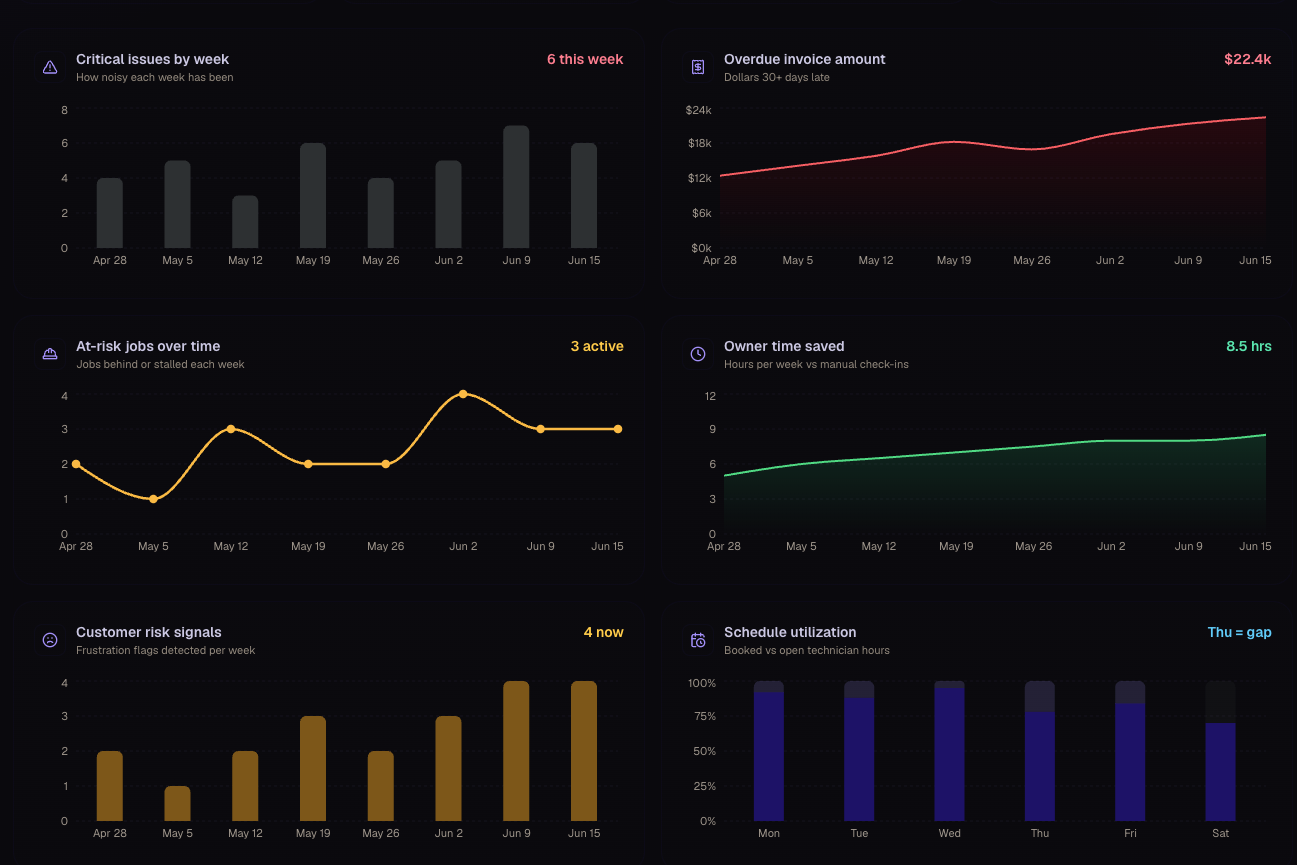
Instead of checking a dozen dashboards, the owner gets a 30-second read on the whole business — and hours back every week. In the live demo it's already saving 8.5 hours a week versus manual check-ins.
Problems it solves
No owner can watch every tool, so the expensive problems — a stalled $40k job, $22k in overdue invoices, a frustrated customer about to leave a bad review — surface too late. OpsBrain catches them first thing and says what to do about them.
What's inside
- Executive dashboard — critical items, at-risk jobs, overdue invoices, schedule gaps and cash at risk at a glance
- AI daily briefing — one plain-English summary with a recommended first action
- Ranked priorities — everything it read, sorted by urgency
- Connected-tool source health — see what synced and what's degraded
- Trends — how issues, overdue cash and owner time saved move week over week
See what AI could do for your business
Get a free AI audit. Tell us about your business and we'll show you the highest-impact systems we could build — from recovering revenue to saving hours to making sharper decisions. No obligation.